How to Upload a Gif to a Post

RVACane

Maude•Gone•Rogue
Maude
Joined
Jan 12, 2014
Messages
60,200
For those who do not know how, this will show you how to add gifs and how to compress gifs which are too big to post.

@puertorricane - attack the mega mopes with gifs!!!

Start a Google search of what you are looking for and add gif or gifs to the search words.
DF113F5B-8368-4E59-8356-D33EFB140A59.jpeg


095A7C19-5B9E-4EE7-B999-1A89CAB1CB82.jpeg
7E261B84-3AB7-4BEB-8866-A5F41F769D71.jpeg
16455455-5FDD-4127-8C87-FE2A05C1FCFB.jpeg
8A891EEE-900C-460D-94F8-EF7F87348D44.jpeg
2F867A00-909C-46FE-82C6-C3699B36C03A.jpeg
9857468C-D5E2-491C-B21B-CCB86A24CF41.jpeg


49F19215-D8F0-4855-984B-C59871E99518.jpeg
C8335547-BC5E-473E-9E1F-53BDC50560B1.jpeg
615C208E-BD76-4F56-AE4E-4FA516E4D598.jpeg
8B201F7F-1DAA-4A1A-B5EE-AF2A99105CBE.jpeg
AD80CF08-90E9-4DAE-865D-D79774511DBC.jpeg

This will take it back to where you post it. When you see the small image, press insert and then full image and the press post.
EA978E5C-87C0-4F52-AD76-817B19B8D2B0.jpeg

A5187DEE-E31A-4F16-B444-CB8D7F64218B.jpeg


Ignore attachments below this line


Attachments
  • 4520E07D-7FF4-4FDD-9CC9-34994D42F525.webp
    4520E07D-7FF4-4FDD-9CC9-34994D42F525.webp
    70.5 KB · Views: 13
  • 6E477A43-4B26-4CEF-922F-13D4ACE2A5FA.webp
    6E477A43-4B26-4CEF-922F-13D4ACE2A5FA.webp
    84.4 KB · Views: 5
  • BE9DD6B9-1294-4BD9-A4A0-AC8233ACF065.webp
    BE9DD6B9-1294-4BD9-A4A0-AC8233ACF065.webp
    111.9 KB · Views: 4
  • F4393D94-1C46-4C08-B20F-999A5607B9D9.webp
    F4393D94-1C46-4C08-B20F-999A5607B9D9.webp
    112.2 KB · Views: 24
Last edited:
Advertisement
****!!! I’m trying to make it follow easily but it’s hard with the layout we have.
 
In short:

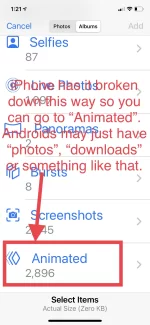
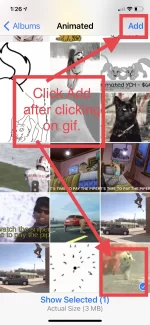
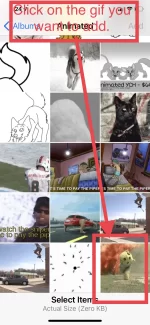
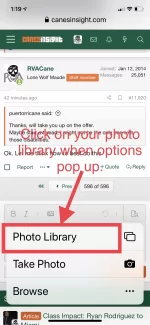
All you do is find a gif and save it to your phone photos. Then attach it and post it in a thread.

If it’s too big then open a new tab and go to ezgif.com. Click on the gif optimizer and upload the photo there. You will see the gif size. If it is over 2.5 [below 10 mb] then you have to compress it. [ note that this has now been increase to 10 mb]

35 is automatically in the Compression Level box (5-200 is range you can use with 200 being the most). You compress it to get below 2.5 and then save the compressed gif to your phone and select it from there when attaching to a post.
 
Last edited:
Advertisement
In short:

All you do is find a gif and save it to your phone photos. Then attach it and post it in a thread.

If it’s too big then open a new tab and go to ezgif.com. Click on the gif optimizer and upload the photo there. You will see the gif size. If it is over 2.5 then you have to compress it.

35 is automatically in the Compression Level box (5-200 is range you can use with 200 being the most). You compress it to get below 2.5 and then save the compressed gif to your phone and select it from there when attaching to a post.

Cosmo Kramer Mind Blown GIF
 
Looks like @Baba Yaga has done this before...
 
Advertisement
Back
Top